Install a Mobile Wallet
To buy CYRUS from your phone, you need a wallet app with a built-in browser. That built-in browser is how your wallet connects to the app automatically - no QR codes, no extra steps.
The top recommendation is Rabby. Its in-app browser is easy to find, and it works well on Base.
You will use the browser built into your wallet app - not Safari, not Chrome. Opening the app from the wrong browser causes the QR code and WalletConnect prompts that confuse people. The in-wallet browser skips all of that.
Recommended: Rabby
Rabby is the top pick. It is available on iOS and Android, has a clean DApp browser tab, shows clear transaction previews before you sign anything, and works well on Base.
- Open the App Store (iPhone) or Google Play (Android)
- Search for Rabby Wallet
- Install and open the app
- Tap Create a new wallet
- You will be given a recovery phrase - 12 words
Write those 12 words down on paper and store it somewhere safe offline. Do not screenshot it or save it in a notes app. Anyone who has those words controls your wallet. There is no recovery if they are lost.
- Confirm the phrase when prompted
- Set up a PIN or biometric lock
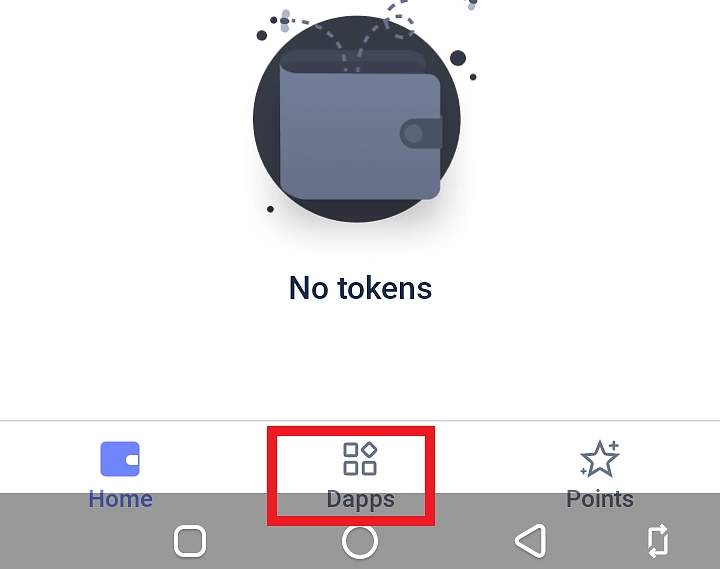
Where is the browser in Rabby? Tap the DApp icon in the bottom navigation bar. You can search for a dApp by name or type the URL directly.
Also Supported
Base (formerly Coinbase Wallet) (iOS & Android)
A solid choice, especially if you already use the Coinbase exchange app.
Where is the browser? Tap the Browser tab in the navigation bar.
MetaMask Mobile (iOS & Android)
Works on both platforms. Good if you already use MetaMask on desktop and want the same wallet on mobile.
Where is the browser? Tap the Explore tab in the bottom navigation bar, then tap the browser icon in the top right corner.
Rainbow (iOS & Android)
A well-designed mobile-first wallet with a simple browser.
Where is the browser? Tap the globe icon in the bottom navigation bar.
Trust Wallet (Android only)
Trust Wallet works for this flow on Android. However, Trust Wallet removed its in-app browser from iOS in 2021 due to App Store restrictions. If you are on iPhone, use one of the wallets above instead.
Where is the browser (Android)? Tap the Browser or DApps tab in the bottom navigation bar.
MetaMask (and most wallet apps) have a “Buy” button - ignore it. Wallet apps hold your crypto; they do not sell it. That button opens a KYC flow inside the app that is slower, more expensive, and unnecessary. Get your USDC from an exchange in the next step and send it to this wallet.
Before You Move On
Make sure:
- your wallet app is installed and open
- you have written your recovery phrase down on paper
- you can find the browser or DApp tab inside the app
If your wallet later buys CYRUS successfully but does not show the token balance automatically, use the manual import guide: Add CYRUS to a Wallet.